 Play with Power |
|
||||||||||||||||||||||||||||||||||||||
|
|||||||||||||||||||||||||||||||||||||||
|
CART Precision Racing Preview
and Player's Guide
From the moment it was announced, CART Precision Racing from Microsoft and Terminal Reality has been highly anticipated by the game playing community, especially the race fans. We now have the demo in hand, and much of it is good. Unfortunately, poor steering wheel and pedal drivers, poor frame rates, non-seamless graphics, and reckless opponent AI prevent this from being a truly great single player game. As a multiplayer game however, its a winner.
CART Precision Racing promised to be the next generation of racing simulations, offering better tracks, 3Dfx graphics, great sounds, and Internet multiplayer capability. Based on the demo, in these areas, we got what we expected. What we didn't expect was that Window95 can cripple our driving equipment. We didn't expect that the 3Dfx graphics can still be slow and troublesome. And we didn't expect that while the look of the game is a step forward, the opponent AI is a step backward. But, the internet multiplayer support really makes this a must-have for racing simulation fans. Our first impression of the CART Precision Racing demo was not good. First, we hooked up our Thrustmaster Grand Prix 1 (GP1) steering wheel and CH Pro pedals to NASCAR2 and took them for a spin. They work well in that game, as they do in IndyCar 2, giving precise control and good response. Then we went over to the Precision Racing demo and attempted to calibrate the wheel and pedals. Black flag! Windows95 does not recognize this combination.
After doing a newsgroup search on DejaNews, downloading new drivers from the Thrustmaster site, digging up the joystick converter from the GP1 box, and playing with the configuration for a couple of days, we finally found that the best we could do was hooking up the GP1 with the joystick converter but without pedals. Fortunately, this wheel has paddles than make driving nearly as fun as with pedals. As an aside, this whole experience prompted us to buy a J-Link joystick switch (see sidebar). Of course, we could have used our trusty CH Flightstick with it, but after driving simulations with a wheel, going back to a joystick just seems unnatural. 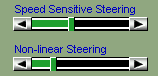
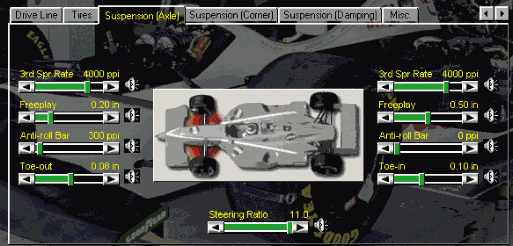
Unfortunately, even after getting the GP1 to work, with Windows95 we found that the input controls were not as nearly precise as we were used to with other driving games. But eventually, we found that by playing with the knobs for "Speed Sensitive Steering" and "Non-Linear Steering" in the Controls panel we could get acceptable results. Still for "precision racing" we expect better input control. The demo comes with three opponents, limits you to no damage, and includes one track, Laguna Seca. The track choice is excellent, and offers the challenge of a road coarse without the complexity of, say, Mid Ohio. There is a very complete garage capability, more like Grand Prix 2 than IndyCar 2, and we're sure the dedicated racer will spend hours fine tuning their setup.
In general, the interface is well designed out and easy to navigate. The trade-off here is that having a pure Windows95 interface for car and game setup does seem to make the game a little less "immersive" than other games. On the other hand, anyone who's tried to tweak the options in Grand Prix 2 knows that making complex interfaces simple is a real art. Terminal Reality did a nice job with Precision Racing. This is good, because there are at least 55 options in the garage alone which must be managed in order to setup your car for the various tracks and at least 60 more in the Options menu to be balanced to get the game to run optimally on your computer. After a while, we found ourselves wishing that the Options panels were organized as a notebook like the garage. But in general, the interface gets an A+ for layout and intuitiveness. They also get an A+ for quality; the demo has not crashed once.
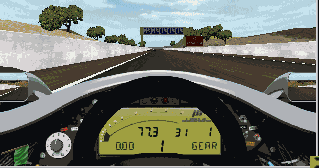
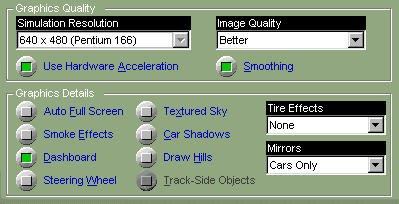
We used an Orchid 3Dfx card running DirectX 5.0 on a P166 with 96MB of memory. With all the graphic options turned to high, the view was indeed stunning; showing trees and hills and skid marks and advertisements galore. A nice effect is that distant objects appear as if out of a fog rather than just jumping into view. However, the frame rate was too slow to play that way, especially when things got busy such as when going through the corkscrew turn. We also found an annoying seam in the track at the end of the first straightaway. Again we found ourselves working the Graphics menu to get the configuration just right. In the end, we found that just about everything turned off, with the middle image quality ("Better") is the best compromise. The rest of the options will just have to wait until our new machine arrives after Christmas. The cars handle well. You can power slide through turn 11 and do donuts and spins off in the gravel, and in general put the car on the edge and recover. This is superior to the squirrelly cars of Grand Prix 2 and slightly more controllable than IndyCar 2. In the demo, going off into the gravel is not fatal, as it is in a real car, and touching wheels with an opponent is more like NASCAR than an open wheel car. Also, the cars don't go flying around the way they do in Grand Prix 2. Changing the configuration definitely changes the way the car works, so finding a good setup will be key to victory. Unlike IndyCar, it looks like you just get one default setup rather than three for each track, but you can save and restore your setups. Your cockpit view is lower than either IndyCar 2 or Grand Prix 2, so the speed effect is greater; although this may contribute to the graphics processing burden. Other camera views are also available, as is replay. One odd addition is an autopilot feature, which turns your car into just another drone. The odd thing is it can go on at strange times and be difficult to turn off. One nice feature is the map feature accessed by pressing the "M" key. This overlays a view of the course along with the position of the cars. There are a series of "driving aids" available, including race line, auto shifting, "stay on track", spin correction, antilock brakes and traction control. We found that driving with all aids off was the most fun. "Stay on track" is for kids. The spin correction can actually be kind of jarring, since the way they do it is just recognize that the car is in the track then jump you back into a better position. Besides, burning out to spin back to face the right way is real cool. We found that antilock brakes and traction control actually limit the amount of control you have, preventing a power slide and the ability to spin your way back into line. The sounds are familiar to IndyCar drivers; one nice aspect of the sounds is when you go by the grandstands, you hear cheering from the speaker on that side.. 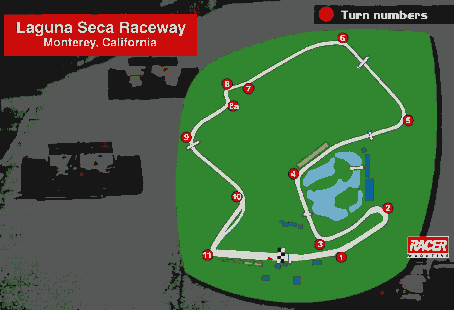
Driving Laguna Seca takes skill and practice. It is a hilly track with several interesting curves and sweeping straightaways. Passing is always a challenge. The starting line leads into the subtle but dangerous turn one, then into one big hairpin curve at turn 2. Try to get on the outside of this going in, toss your car out right before you turn in, then feather the throttle before accelerating through. You should be able to enter the curve at the low end of second gear and shift as you exit. Then floor it and accelerate shift up to fourth or fifth, then back down to third approaching turn 3. Accelerate out and again up to fifth and down again approaching turn 4, which can be taken in third or fourth depending on your speed. There is no passing possible through turns 2, 3, and 4. We find turn 5 to be the trickiest in the course. Getting through turn 5 cleanly is critical to a good lap time. You need to have good momentum for the hill, but if you go too fast, you'll be in the gravel. You should be able to enter turn 5 at the bottom end of fourth gear with good power, although in traffic take it in 3rd. Turn 6 can be taken in forth, then its up the hill for the corkscrew. The key to the corkscrew is track position. You need to be set up right and not have too much speed; you need to start slowing down before you see the curve, and you need to start your turn so you just about clip the left hand wall, then crank it around right. When done right, you can carry quite a bit of speed through the 'screw, which can be a problem because turn 9 will start to get you as you get better at the 'screw. Down the hill is a fast ride, then come into 11 hot. It looks like they mapped the new layout of this section of the track; it was remodeled in 1996 to make turn 10 longer and add some room on turn 11. Going into turn 11 is a good place to pass, you just have to brake later than your opponent. There are two ways to take turn 11; you can be conservative and creep around, or you can slide through with the power down. Then on through to the start/finish line. The pit lane entrance is before turn 11, and remember there's a very sharp chicane at the entrance to pit road. The big flaw with Precision Racing is the opponent Artificial Intelligence. If you ever find yourself going slowly along the racing line, the opponent cars will simply drive through you, knocking you off the track while continuing on their way unscathed. You can watch this by stopping your car on the track and then switching cameras to another car. If they hit your car, they will just push it along like a snow plow until the path is clear, then go on their way. This occurs even in the slow parts of the track where they have clear visibility and could easily steer around. One reviewer quipped that the AI went to the "Michael Andretti school of driving", referring to that unfortunate period where Michael had more than his share of "racing incidents". In the demo, there are only four cars on a road course, so staying out of the way is pretty easy. When a similar problem occurred three years ago in IndyCar 1, we found that it was most prevalent on the high speed ovals such as Michigan. Unless this flaw is fixed in a patch, some tracks may not be drivable with computer opponents. But multiplayer rocks! The demo supports two players and its free. Just go to the www.zone.com, join a room and get started. Or, go to Kali and the racing room. Starting a multiplay game puts you in a Precision Racing chat room and lets you evaluate lag and set everything up before starting. As the game starts, you will be in autopilot mode for the first few seconds, then just before the first curve you suddenly get control. On the road, your game plays pretty smooth, it looks like lag is handled by positioning the other car at its vector when the packet is received... so the effect is that the opponents cars can jump around. The alternative is more like how Comanche 3 or Armored Fist 2 handle it, where everyone is synchronized on each couple of frames displayed. We suspect that with many players, the cars will tend to be invisible and dance a bit, like NASCAR2. But find a compatible opponent, and the competition will really get your heart pounding. Also, at the end of the race, it appears that everyone must wait for everyone else to finish before leaving the race and returning to the chat room. There are a couple of things to watch out for in a multiplayer game. First, we had one multiplayer game where one car was going twice as fast as the other. We suspect it was because the machine with the slow car had all the graphics cranked up while the other machine had them all turned off. This could have been a coincidence and the effect was due to network glitches. We recommend putting all graphics options off except "dashboard" for multiplayer. It also raises the concern that if you have a faster computer, you will have a faster cars. These allegations are as yet untested. Another thing to be aware of is that you should negotiate the "driving aids" before you begin. A player with some driving aids (especially "stay on track") will have a great advantage. We recommend always racing without any driving aids at all times. Well, OK, turn on the racing line when learning a new track. Also, remember to turn up your fuel feed by pressing the "4" key a few times. Theoretically, you should also be able to increase you boost, but it looks like in the demo on Laguna Seca this causes the pop-off valve to start popping (either that or there's a bug in the sound). Finally, remember that a multiplayer opponent can cheat very easily, all they have to do is turn on autopilot. The bottom line is, as usual these days, the game is great in some ways but deficient in others. We need more powerful computers to handle the graphics, and the game needs a patch to fix the joystick control, improve opponent AI, and disable autopilot in multiplayer. We'll have to wait for the production game to see how significant the poor AI affects game play. As for multiplayer, assuming the lag isn't too bad, this will be a must have game for all virtual racers.
Reviewed for GameBlazer.Com by Celsius (11/17/98) Related Links: |
||||||||||||||||||||||||||||||||||||||



| |
|
|
|
| Web page problems? Please contact us. | |
| Material and Code Copyright © 1999,
ZeBlazer Systems Incorporated. All rights reserved. "GameBlazer", "Swap-and-Play",
"Intergalactic Catalog", "The Power of Fun", "ZeBlazer" and the little blue jet
image are trademarks of ZeBlazer Systems Incorporated. GameBlazer and this site
may include information which may be copyrighted by game publishers and
developers. This information remains the property of its owners and is used
with permission or within their guidelines for use. Game and site names may be trademarked and remain the property of their owners. |
|